

Your website can only make money if people find it. That’s why WordPress SEO Services are essential — they help your site appear on Google and bring you real traffic.
In this guide, you’ll discover exactly how these services work and how to make your WordPress site perform at its best.
Table of Contents
What Are WordPress SEO Services?
WordPress SEO Services include all the actions needed to make your website visible in search engines — from technical improvements to on-page and content optimization.
How SEO Helps Your Site Show Up on Google
SEO ensures your website speaks the same language as Google.
When users search for “best coffee shop in Lisbon,” optimized sites appear first.
That’s the power of SEO — visibility that drives customers.
The Difference Between General SEO and WordPress SEO
WordPress SEO leverages platform-specific features like plugins, themes, and structure.
It’s faster, easier to scale, and ideal for small businesses that want fast growth.

Main Components of WordPress SEO Service
1. Technical Optimization (CPanel WordPress, Speed, and Cron Jobs)
SEO starts at the hosting level.
A well-configured CPanel WordPress setup, optimized cron jobs, and a site loading under 2 seconds all help Google rank you higher.
2. SEO Plugins and Tools
Use tools like Yoast SEO or RankMath to optimize your content.
They guide you to improve keyword usage, meta tags, and readability.
3. Fast and Minimalist WordPress Themes
Choose the fastest WordPress theme or a minimalist WordPress theme to reduce code bloat and improve speed — both critical for SEO.
4. On-Page SEO and Structure
Focus on keyword-rich titles, meta descriptions, and internal links.
This helps Google understand your content and users stay longer.

Advanced WordPress SEO Strategies
Use WordPress Headless CMS
Pair WordPress with React for performance and flexibility.
A headless CMS setup gives you modern front-end speed with powerful backend SEO control.
Optimize WordPress eCommerce Plugins
If you use WooCommerce, optimize every product page with unique descriptions, compressed images, and structured data.
These WordPress SEO Services can dramatically boost sales visibility.
Example: WordPress Restaurant Theme Optimization
A WordPress restaurant theme with menus, schema markup, and Google Maps integration attracts more bookings.
WordPress SEO vs. Doing It Yourself
When to Hire Custom WordPress Development Services
Professional WordPress SEO Services handle everything — from audits and keyword research to monthly reports.
This saves you time and prevents costly mistakes.
What to Check Before Paying for WordPress SEO Services
Always verify:
- Detailed performance reports
- Real optimization beyond plugin installation
- Transparent communication
Alternatives: Webflow to WordPress
Migrating from Webflow to WordPress gives you more SEO control and flexibility.
Examples and Best Practices
Learn from Successful WordPress Blog Examples
Study websites that rank high.
Look at their internal links, keyword density, and content depth.
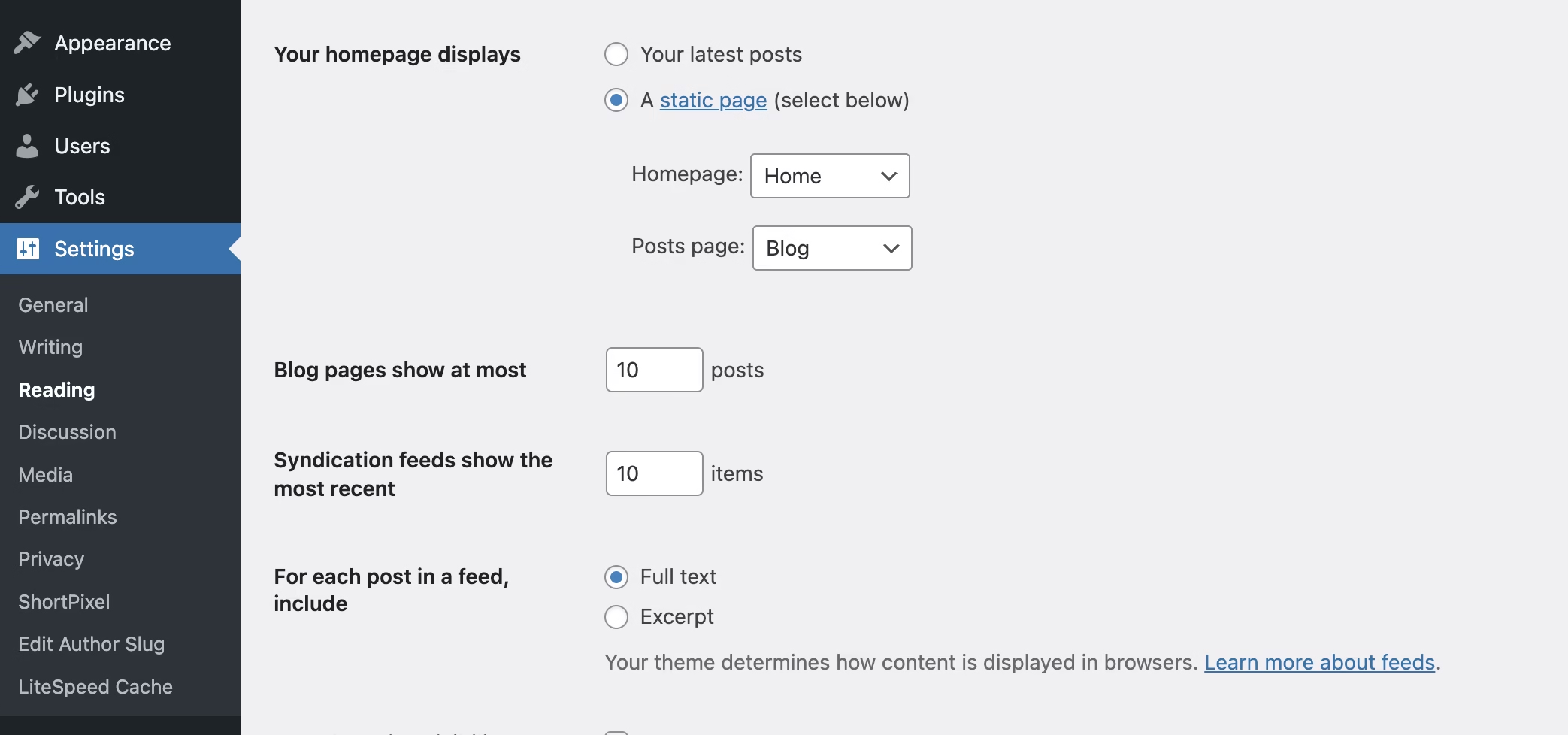
Set and Optimize Your Homepage (WordPress Set Homepage)
Go to Settings → Reading to define your homepage.
Use CTAs, keyword-rich text, and lightweight visuals.
Frequently Asked Questions
1. Is WordPress good for SEO?
Yes, it’s one of the best CMSs for SEO thanks to clean code and plugin support.
2. What’s the best SEO plugin for WordPress?
Yoast SEO is great for beginners; RankMath offers advanced features.
3. How much do WordPress SEO Services cost?
Prices range from €200–€800/month depending on goals and site size.
4. Can I use WordPress with React?
Yes — via a WordPress headless CMS, ideal for performance-focused projects.
5. What’s the best theme for consultants?
A lightweight consulting WordPress theme with fast load time and responsive design.
Conclusion
A solid WordPress SEO Service can turn your website into a 24/7 lead generator.
It’s more than ranking — it’s about visibility, credibility, and consistent growth.
Want your WordPress site to rank higher on Google? Contact Merces Web for professional SEO support.
Comments are closed